How to protect passwords, digital accounts, cryptocurrency, documents and family memories without handing one person the keys to your entire digital life.
The day someone asks, “What was the password?”
Imagine a family dealing with a death.
The bank account is known. The house papers are known. The insurance policy is somewhere in a drawer.
Then someone asks about the email account.
Nobody knows the password.
The recovery phone is an old number. Two-factor authentication points to a device nobody can unlock. Cryptocurrency exists, but nobody knows whether it is held on an exchange, in a wallet or behind a seed phrase. Years of photographs sit inside a cloud account. Tax records are buried in an email inbox.
The family may know that the assets exist. That does not mean they can legally, technically or safely reach them.
This is the central problem of digital inheritance: ownership, information and access are three different things.
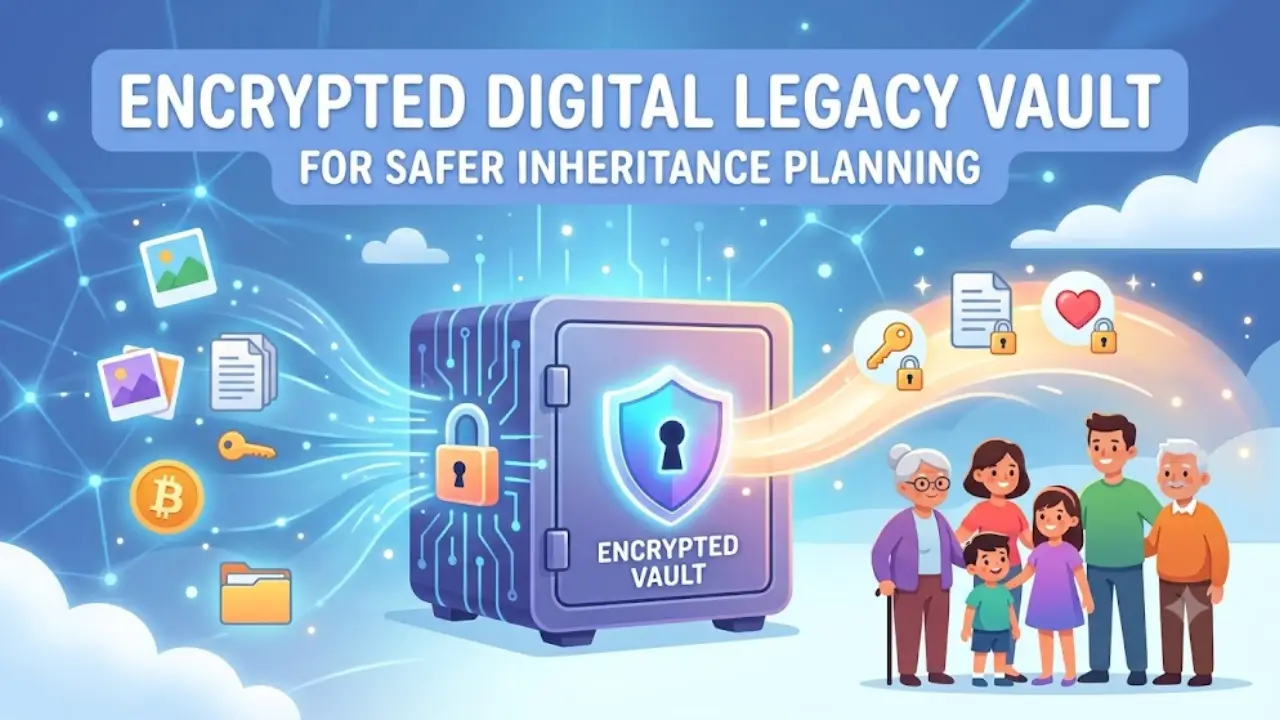
A digital legacy vault is an attempt to connect them without creating a giant security hole while you are alive.
The objective is not to give somebody your passwords today.
The objective is to create a controlled recovery system that can become useful only when genuinely required.
Why ordinary password sharing is the wrong solution
The traditional solution is surprisingly simple:
“I’ll give my spouse all my passwords.”
It sounds practical. It is also a dangerous architecture.
A single document containing every password creates a single point of catastrophic failure. If it is stolen, photographed, forwarded, uploaded accidentally or accessed by an unauthorised person, the attacker may obtain email, banking, investments, cloud storage, social media and identity-recovery channels simultaneously.
Modern authentication guidance treats authentication secrets as security-sensitive credentials, while NIST specifically recognises risks including theft, phishing, social engineering, compromised devices and insecure recovery mechanisms.
There is another problem: passwords are not the only keys anymore.
A person’s digital estate may contain:
Passwords and passkeys
Email accounts
Cloud storage
Smartphones and computers
Two-factor authentication devices
Recovery codes
Bank and investment accounts
Insurance information
Tax records
Cryptocurrency exchanges
Self-custody crypto wallets
Seed phrases and private keys
Domain names and websites
Social-media accounts
Photos and family archives
Intellectual property
Subscription services
Important correspondence
Digital identity documents
The vault therefore should be an inventory-and-recovery system, not simply a password list.
What belongs in a digital legacy inventory?
Think in five layers.
| Layer | What to record | Should the vault contain the actual secret? |
| Identity | PAN, passport, insurance, tax references | Usually no; record location and instructions |
| Financial | Banks, mutual funds, securities, insurance | Usually no; record institution, account identifier and nominee |
| Digital | Email, cloud, domains, subscriptions | Sometimes |
| Authentication | Password manager, recovery codes, security keys | Yes, but highly protected |
| Crypto | Exchanges, wallets, seed phrases, private keys | Extremely carefully; access architecture matters more than inventory |
The most useful inventory does not necessarily contain everything.
For example:
Bank:
“Bank X — account ending 4821 — nominee registered — branch details in physical file.”
That is often more useful and safer than placing the entire banking password inside a spreadsheet.
For cryptocurrency, however, the situation changes.
If the asset is held in a self-custody wallet, knowing that the wallet exists may be worthless without the necessary recovery material. The inventory must therefore distinguish between:
“This asset exists” and “This asset can actually be recovered.”
The three-part architecture: Vault + Key + Legal instruction
A resilient system should separate three things.
A. The vault
This contains encrypted information such as:
account inventory
instructions
selected passwords
recovery codes
encrypted documents
crypto recovery instructions
location of physical records
B. The access mechanism
This determines who can eventually obtain the vault and under what circumstances.
Examples include:
password-manager emergency access
a trusted-contact mechanism
encrypted offline backup
split-key arrangements
a sealed physical instruction stored with an executor
C. The legal layer
A will, nomination, power of attorney where appropriate, estate documents and instructions should determine who is entitled to what.
The vault should not attempt to replace the legal estate.
That distinction matters.
For example, RBI guidance says a nominee receiving a deceased depositor’s bank balance in the relevant circumstances receives it as a trustee for the legal heirs; nomination therefore facilitates settlement but does not automatically answer every question of beneficial ownership.
Choosing the right technology
There is no universal “best” vault. The right architecture depends on what is being protected.
| Method | Main strength | Main weakness | Suitable for |
| Password manager | Excellent for credentials and controlled emergency access | Dependent on provider/account recovery | Everyday digital accounts |
| Encrypted cloud storage | Convenient and synchronised | Account compromise or lockout risk | Documents and encrypted archives |
| Encrypted external drive | Offline control | Can be lost or damaged | Long-term backup |
| Paper/metal backup | Resistant to online attack | Physical theft, fire or deterioration | Critical recovery information |
| Split-secret system | No single person holds everything | More complicated to maintain | High-value estates/crypto |
| Provider legacy tools | Built into major ecosystems | Scope varies by provider | Cloud accounts and photos |
Password managers can be particularly useful because some now provide formal emergency-access systems rather than requiring the user to reveal a master password.
For example, Bitwarden’s Emergency Access allows a designated contact to request access, with the account holder able to approve or deny the request or an access period eventually expiring into access according to the configured arrangement.
1Password’s Emergency Kit provides another model: the user is encouraged to retain recovery information securely outside the normal account environment.
The important lesson is architectural:
Do not confuse “someone knows my password” with “someone has authorised emergency access.”
Build the vault: a practical seven-step system
Step 1 — Create the inventory
Start with a spreadsheet or encrypted document.
Use columns such as:
Asset → Institution → Account identifier → Asset type → Nominee → Executor relevance → Recovery method → Location → Last verified → Action after death
Do not initially enter every password.
First map the estate.
This reduces the chance that you spend three weeks securing information that nobody actually needs.
Step 2 — Classify information by sensitivity
Use three categories:
Green — locator information
Examples:
bank name
insurance company
mutual-fund platform
domain registrar
cloud provider
Amber — sensitive information
Examples:
account numbers
recovery email
tax information
encrypted documents
Red — control information
Examples:
password-manager master credential
recovery codes
hardware-security-key information
crypto seed phrase
private key
The red category should receive the strongest protection and the fewest copies.
Step 3 — Encrypt the vault
Use a reputable password manager or established encrypted-storage solution rather than inventing your own cryptographic system.
The reason is simple: encryption is only as good as its key management.
OWASP warns that encrypted information can become permanently unrecoverable when the encryption key is lost and therefore recommends secure key backup and tested recovery procedures. It also recommends encrypted backups and routine restoration testing.
This creates a paradox:
A secret that nobody can access is secure — and useless.
Your objective is controlled recoverability.
Step 4 — Create two independent backups
A sensible personal model is the 3-2-1 backup principle:
3 copies
on 2 different media
with 1 copy stored off-site
CISA/US-CERT has long recommended this approach for protecting important data from loss or corruption.
For a digital legacy vault, consider:
Copy 1: encrypted primary vault
Copy 2: encrypted offline drive
Copy 3: encrypted/off-site backup
But do not make three identical copies of the most dangerous secret and leave them in three ordinary locations.
Security requires thinking about copies as attack surfaces as well as backups.
Step 5 — Designate trusted access
This is where the system becomes a legacy mechanism rather than an encrypted filing cabinet.
A useful structure is:
Primary trusted person: spouse or family member
Secondary trusted person: executor/another trusted relative
Professional contact: lawyer/estate professional where appropriate
But avoid giving everyone everything.
For example:
Spouse → family documents and financial map
Executor → estate administration information
Child → selected personal archive after death
Crypto specialist/trusted professional → crypto recovery instructions where necessary
The principle is least privilege.
Nobody needs universal access merely because they are trusted.
Use provider-specific legacy controls where available
Your own vault should not try to replace tools that technology companies have already built for succession.
Apple’s Legacy Contact system allows a chosen person to request access to certain Apple Account data after death. Apple requires the access key and proof of death, and specifically excludes some categories such as passwords and passkeys stored in iCloud Keychain.
Microsoft’s OneDrive Digital Legacy can provide a trusted person with read-only access to OneDrive files and photographs. Microsoft also states that where this has not been established, it may generally be unable to provide account information to non-account holders because of privacy and legal constraints.
These systems demonstrate an important point:
A digital legacy plan should be account-specific.
One universal master password is often less useful than several carefully designed recovery paths.
What about the “dead man’s switch”?
A dead man’s switch is a system that performs an action after a period of inactivity unless the owner intervenes.
In digital legacy planning, that might mean:
You configure an inactivity period.
The system contacts you.
You confirm that you are still active.
If you do not respond, the system eventually triggers the configured action.
The attraction is obvious.
The weakness is equally obvious.
Inactivity is not proof of death.
A person could be:
hospitalised
travelling without internet
locked out of an account
using another device
suffering a technical failure
deliberately inactive
unable to respond temporarily
Therefore, a dead-man’s switch should preferably be treated as a trigger for human verification, not automatic proof of death.
The strongest architecture is:
inactivity signal → trusted-person verification → documentary evidence → controlled access
rather than:
inactivity → everything unlocked
Crypto needs a different level of caution
Cryptocurrency can expose the biggest weakness in digital estate planning: possession of the recovery credential can equal possession of the asset.
An exchange account and a self-custody wallet should therefore be treated differently.
Exchange-held assets
Record:
exchange name
account identifier
nominee/inheritance contact where available
jurisdiction
tax records
recovery method
Do not simply leave the exchange password in an ordinary document.
Self-custody assets
Record:
wallet type
blockchain/network
public address
approximate asset type
location of recovery material
recovery procedure
succession instructions
A seed phrase should never be casually photographed, emailed or stored in an unencrypted spreadsheet.
The family also needs to understand that crypto succession can involve tax, identity verification, anti-money-laundering procedures and jurisdictional rules.
FATF’s virtual-asset framework requires jurisdictions and regulated virtual-asset service providers to apply measures such as customer due diligence, record keeping and relevant originator/beneficiary information for transfers.
For Indian taxpayers, the Income Tax Department states that income from Virtual Digital Assets is subject to the special 30% tax regime under Section 115BBH, with VDA transactions disclosed through the relevant tax-return schedule.
That makes a crypto inventory more than a technical document. It is also a tax and estate record.
Cross-border inheritance changes the problem
Digital assets do not necessarily sit in the country where their owner lives.
A person might live in India, hold securities in another jurisdiction, use a US cloud provider, keep cryptocurrency with an overseas exchange and have family members living elsewhere.
Now there are several possible legal questions:
Which country’s succession law applies?
Where is the asset legally located?
Who can prove authority?
What documents must be certified?
Is a death certificate sufficient?
Is probate required?
Does the provider accept foreign estate documents?
What tax obligations arise?
There is no universal international answer.
Within the EU, for example, the Succession Regulation generally connects succession jurisdiction and applicable law to the deceased person’s habitual residence, while allowing certain choices of law based on nationality. It also provides a European Certificate of Succession for proving heir or executor status across participating EU countries. Ireland and Denmark do not participate in the regulation.
Outside such frameworks, the position can be substantially more complicated.
The practical lesson is simple:
If an asset, provider, beneficiary or owner crosses a national border, ask a qualified estate professional before assuming that a password, nominee or will settles the issue.
The recovery test: test the system without exposing the secrets
This is the step most people skip.
Do not wait for a death to discover that the “backup” cannot be opened.
Conduct a controlled annual test.
Test 1 — Inventory
Ask the trusted person:
“Can you identify where the important accounts and documents are?”
They should not need to see the passwords.
Test 2 — Recovery path
Ask:
“If I disappeared tomorrow, what would you do first?”
The answer should lead to the emergency instructions, not to guesswork.
Test 3 — Key availability
Verify that the recovery mechanism still works.
Do not reveal the actual secret unnecessarily.
Test 4 — Backup integrity
Confirm that encrypted backups exist and can be restored.
Test 5 — Provider controls
Check Apple, Microsoft, Google and other relevant legacy settings.
Test 6 — Legal alignment
Check whether:
nominees are current
the will is current
executor details are correct
family circumstances have changed
Test 7 — Kill the old copies
If a password, recovery code or seed phrase changes, retire the old copy.
An obsolete backup can become a security liability.
The “two-person rule” for very sensitive assets
For particularly valuable estates, consider separating knowledge.
For example:
Person A: knows where the encrypted vault is.
Person B: controls a separate recovery component.
Executor: holds legal authority.
Professional adviser: understands the succession procedure.
No single ordinary family member automatically receives unrestricted access to everything.
This resembles a basic principle used in high-security environments: divide critical authority so that one compromised person cannot compromise the entire system.
It also protects families from another uncomfortable risk — disputes.
The goal is not to distrust relatives.
It is to design a system that does not require trust to do all the security work.
A simple digital legacy blueprint
A practical household system can therefore look like this:
DIGITAL LEGACY VAULT
→ Master inventory
↓
→ Encrypted password manager
↓
→ Emergency-access contact
↓
→ Encrypted offline backup
↓
→ Separate physical recovery instructions
↓
→ Will + nominations + executor
↓
→ Provider-specific legacy settings
↓
→ Annual recovery test
This is much stronger than:
“My spouse knows my password.”
The first is a system.
The second is a single point of failure.
Practical checklist
Before declaring the vault finished, confirm:
Every important digital asset has been inventoried.
Bank and investment nominees are current.
The will and executor information are current.
Email accounts are included.
Cloud storage is included.
Password-manager emergency access is configured where appropriate.
Recovery codes are protected.
Important documents are encrypted.
At least one backup is offline.
At least one backup is off-site.
Crypto wallets are separately documented.
Crypto recovery information is not sitting in plain text.
Apple/Google/Microsoft legacy controls have been reviewed where relevant.
A trusted person knows that the system exists.
Nobody has unnecessary access to the entire vault.
Recovery has been tested.
The system has a review date.
The deeper lesson: digital inheritance is really access engineering
Death exposes a strange weakness of the modern digital world.
We have become very good at authenticating the living and surprisingly awkward at transferring legitimate access after death.
That is why the answer is not a bigger spreadsheet of passwords.
It is access engineering.
The strongest digital legacy system separates:
ownership from access,
information from credentials,
credentials from recovery keys,
recovery from legal authority,
and legal authority from personal trust.
The result is not perfect security. Nothing involving human beings, cloud services and inheritance law is perfect.
But it can be resilient.
And resilience is the real objective.
A good digital legacy vault should allow the right person to find the right information at the right time — without giving anyone the keys to your entire digital life today.
Key Unfoldings
Build an inventory before collecting passwords.
Use a reputable password manager or established encryption technology.
Prefer emergency-access mechanisms over casual password sharing.
Keep independent encrypted backups.
Separate highly sensitive credentials from ordinary account information.
Treat cryptocurrency as a special category.
Use provider-specific legacy tools wherever available.
Never assume inactivity proves death.
Align the digital plan with the will, nominations and executor arrangements.
Test recovery every year without unnecessarily exposing the underlying secrets.
Digital-legacy law varies substantially by jurisdiction and by service provider. This guide is an information and preparedness resource, not a substitute for legal, tax or estate-planning advice.
Verified sources and government/official resources
The article above draws particularly on these primary or authoritative sources:
- Apple Support — Legacy Contact: explains Apple’s current Legacy Contact mechanism, access key, death-certificate requirement and limitations on accessible data.
- Microsoft Support — OneDrive Digital Legacy: explains Microsoft’s read-only digital-legacy facility and its procedures when no legacy arrangement exists.
- Bitwarden — Emergency Access: documents its trusted-contact emergency-access mechanism and controlled request process.
- 1Password — Emergency Kit: documents the offline recovery concept for account access.
- NIST SP 800-63B: authoritative guidance on authentication threats, recovery, phishing resistance and authenticator security.
- OWASP Key Management / Secrets Management: guidance on encryption keys, backups, restoration testing and emergency recovery.
- CISA/US-CERT: established 3-2-1 backup guidance for important data.
- Reserve Bank of India: nomination and settlement procedures for deceased depositors, including the role of nominees and legal heirs.
- Income Tax Department of India: legal-heir procedures and treatment/reporting of Virtual Digital Assets.
- FATF: international standards concerning virtual assets and virtual-asset service providers.
- European Union / EUR-Lex: cross-border succession rules and applicable-law framework.
- GOV.UK: official guidance on wills and the legal transfer of money, property and possessions after death.


Leave a Reply