
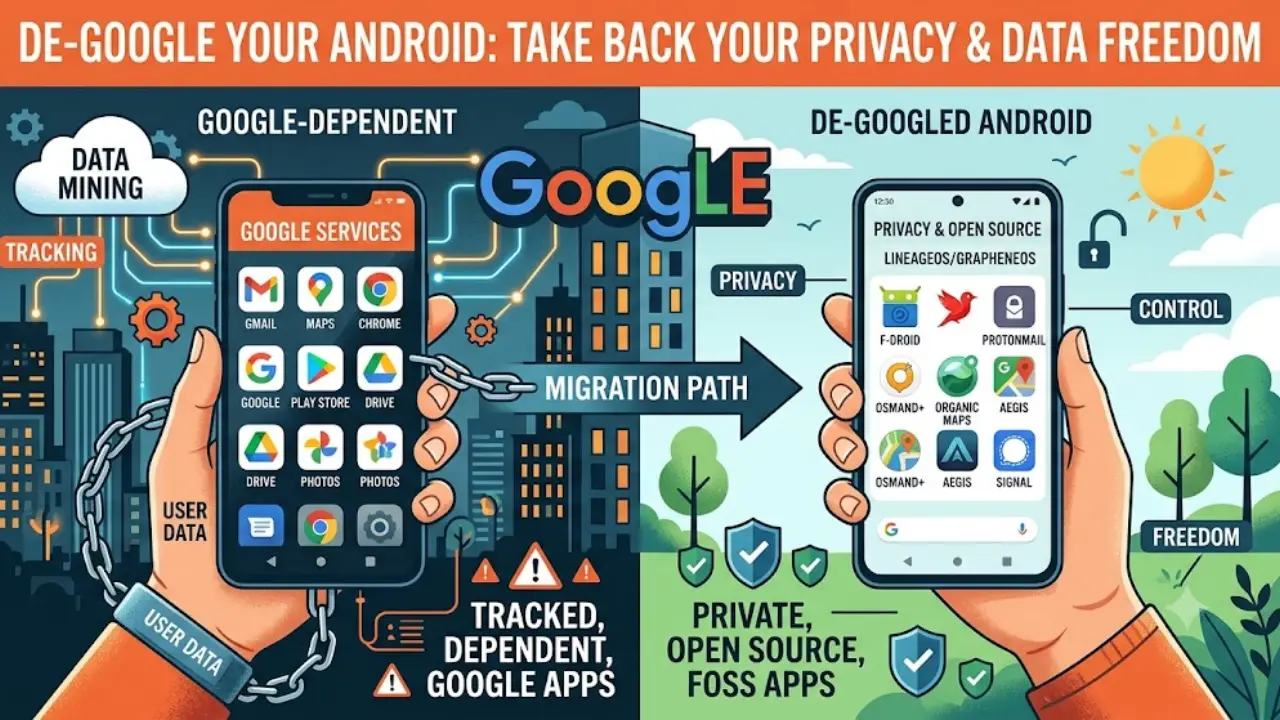
How to reduce Google’s grip on your phone, protect passwords and digital assets, preserve banking and UPI access, and build an encrypted digital legacy system that your family can actually recover.
One phone. Two problems nobody thinks about early enough.
The modern smartphone has quietly become something much bigger than a telephone.
It is a bank branch, passport-sized identity device, photo album, office, map, wallet, diary, authentication token, family archive and key to dozens of other accounts.
That creates two problems.
The first is dependency.
A person may believe they own an Android phone, yet important parts of everyday life may depend on Google’s Play Services, cloud infrastructure, notification systems, location services or application-integrity checks.
The second is continuity.
What happens when the owner cannot use that phone anymore?
Death is the obvious example. But the same problem can arise through hospitalisation, dementia, a lost device, a destroyed backup, a forgotten password or the loss of a recovery phone.
Suddenly the family discovers that knowing what exists is not the same as knowing how to access it.
That is why these two apparently different projects — de-Googling Android and creating a digital legacy vault — belong in the same conversation.
Both are really about one thing:
Who controls your digital life, what does that control depend upon, and what happens when you are no longer there to operate it?
This is the deeper privacy question.
De-Googling is not the same as deleting Google
“De-Googling” sounds like a simple housekeeping exercise.
Delete Chrome.
Remove Gmail.
Uninstall Google Photos.
Install F-Droid.
Done.
Except it isn’t.
Modern Android is better understood as a chain:
hardware → Android → Google services → application ecosystem → cloud accounts → authentication → financial services
Removing a Google icon therefore does not necessarily remove the underlying dependency.
Google Play Services provides APIs used by applications for functions such as notifications, location and other services. More importantly for financial applications, Google’s Play Integrity system allows developers to receive device and application integrity information and use it when deciding how an application behaves.
This is why:
Removing an app is easy. Removing a dependency is harder.
And it is also why a supposedly successful privacy migration can suddenly fail at the banking counter.
The real objective: reduce dependency, not chase purity
There are at least five different meanings of “de-Googled.”
| Level | What you change | Difficulty |
| 1 | Remove unwanted Google apps | Low |
| 2 | Replace Google services selectively | Moderate |
| 3 | Replace Play Store while retaining some Google components | Moderate |
| 4 | Install GrapheneOS/CalyxOS | Advanced |
| 5 | Remove virtually every Google dependency | Advanced/technical |
There is no prize for reaching Level 5.
A phone that is theoretically Google-free but cannot receive a banking OTP, run an essential work application or make a UPI payment may be less useful to its owner than a carefully configured phone that retains a small amount of Google compatibility.
That is the first principle of high-agency privacy:
Choose the dependency you are willing to accept instead of accepting every dependency by default.
Start with an inventory — not a ROM
Before changing the operating system, list what your phone actually does.
Divide applications into three groups.
Must work
Bank applications
UPI
Authentication
Work applications
Government services
Essential messaging
Password manager
Useful but replaceable
Maps
Cloud storage
Photo backup
Calendar
Notes
Browser
Travel applications
Disposable
unused Google applications
duplicate utilities
applications you rarely use
unnecessary social-media clients
This simple exercise can prevent hours of troubleshooting.
More importantly, it reveals something uncomfortable:
Your privacy architecture is often determined by the least replaceable application you use.
If your employer requires one application that depends on Google Play, your practical privacy architecture has to accommodate that reality.
GrapheneOS, CalyxOS and ordinary Android are three different philosophies
The choice is not simply “Google versus no Google.”
Ordinary Android
Maximum ecosystem compatibility is generally the objective.
Google services are deeply integrated into many manufacturer builds.
GrapheneOS
GrapheneOS does not include Google Play by default.
If you need it, official Google Play components can be installed as ordinary sandboxed applications. They do not receive the privileged access they normally receive on conventional Android, and they can be confined to a particular user or work profile.
This creates an interesting compromise:
Google-dependent applications can live in one profile while the rest of the phone remains more tightly controlled.
CalyxOS
CalyxOS takes a different route by integrating microG, an open-source implementation intended to provide portions of the Google-services functionality required by Android applications.
CalyxOS allows users to choose how much Google-related functionality they want.
With microG disabled, the system becomes more completely de-Googled, but application compatibility and push notifications can suffer.
With microG’s push-notification functionality enabled, some Google infrastructure remains involved.
That is not a contradiction.
It is a trade-off.
microG illustrates the whole privacy problem
CalyxOS explains that microG can provide compatibility, notifications and location-related functionality without installing the complete proprietary Google Play Services stack.
But its own documentation makes the trade-off clear: users can enable Google-backed push notification infrastructure, which CalyxOS describes as semi-anonymous when no Google account is used.
So the honest description is not:
“microG removes Google.”
It is:
“microG can reduce the amount of Google software and functionality your phone depends on while preserving compatibility with some applications.”
That distinction is precisely the kind of nuance a serious privacy article should preserve.
F-Droid is useful — but it is not a magical security certificate
F-Droid provides a large catalogue of free/open-source Android applications.
That makes it extremely useful for reducing dependence on proprietary ecosystems.
But open source does not automatically mean:
secure
maintained
private
free of vulnerabilities
suitable for banking
The important habit is to inspect an application’s maintenance status, permissions, dependencies and F-Droid warnings rather than assuming:
F-Droid = safe.
The same principle applies to alternative APK sources.
An unknown APK website is not a privacy strategy.
It is simply another supply-chain decision.
The Indian problem: your bank does not care about your privacy philosophy
This is where the abstract discussion hits everyday life.
India’s UPI infrastructure processed 24,508.96 million transactions in August 2026, involving 752 live banks, with transaction value of approximately ₹29.82 lakh crore for that month.
That scale matters.
For an Indian user, a smartphone without reliable banking and UPI functionality is not merely inconvenient.
It can become unusable for ordinary financial life.
And there is a technical reason for uncertainty.
Google’s Play Integrity system can distinguish different levels of device integrity. For Android 13 and newer, for example, Google’s MEETS_STRONG_INTEGRITY requires a genuine and certified Android device plus recent security updates across relevant partitions.
An application developer can use such signals in its own access policy.
Consequently:
The same bank application can behave differently on different Android installations.
Practical Indian app compatibility matrix
The following is a risk-oriented migration matrix, not a guarantee.
Application behaviour can change with updates, device configuration, Play Integrity requirements and server-side policies.
| Indian service | GrapheneOS + sandboxed Play | CalyxOS + microG | Fully Google-free setup | Test before migration |
| Google Pay | 🟡 Conditional | 🟠 High caution | 🔴 Do not assume | Registration, UPI, payment |
| PhonePe | 🟡 Conditional | 🟠 Conditional | 🔴/🟠 | Bank linking, UPI |
| Paytm | 🟡 Conditional | 🟠 Conditional | 🔴/🟠 | Login, UPI, device verification |
| BHIM | 🟡 Conditional | 🟠 Conditional | 🔴/🟠 | Registration + transaction |
| SBI/YONO | 🟡 Conditional | 🟠 Conditional | 🔴/🟠 | Device registration + OTP |
| HDFC Bank | 🟡 Conditional | 🟠 Conditional | 🔴/🟠 | Login + transaction |
| ICICI iMobile | 🟡 Conditional | 🟠 Conditional | 🔴/🟠 | Login + UPI |
| Axis Mobile | 🟡 Conditional | 🟠 Conditional | 🔴/🟠 | Login + UPI |
| Kotak | 🟡 Conditional | 🟠 Conditional | 🔴/🟠 | Registration |
| Groww/broker apps | 🟡 Conditional | 🟠 Conditional | 🟠/🔴 | KYC + trading/payment |
| DigiLocker | 🟡 Conditional | 🟠 Conditional | 🟠 | Login + document access |
| UMANG | 🟡 Conditional | 🟠 Conditional | 🟠 | OTP + services |
| mAadhaar | 🟡 Conditional | 🟠 Conditional | 🟠 | Authentication |
| IRCTC | 🟡 Conditional | 🟠 Conditional | 🟠 | Login + booking |
| 🟢 Generally workable | 🟢 Generally workable | 🟡 | Notifications | |
| Signal | 🟢 | 🟢 | 🟢 | Registration + notifications |
| Authenticator apps | 🟢 | 🟢 | 🟢/🟡 | Codes + push approval |
| Organic Maps | 🟢 | 🟢 | 🟢 | Navigation |
| OsmAnd | 🟢 | 🟢 | 🟢 | GPS + offline maps |
| Nextcloud | 🟢 | 🟢 | 🟢 | Sync + restore |
| F-Droid | 🟢 | 🟢 | 🟢 | Updates |
Important: “🟢” means the Google dependency is generally less central; it does not constitute an official compatibility guarantee.
For banking and UPI, 🟡 means “test it before you depend on it.”
Test UPI like a financial system, not like an app
Opening PhonePe and seeing its home screen is not a compatibility test.
Do the following:
Test 1 — Registration
Can the application recognise your device and SIM?
Test 2 — SMS verification
Can it complete the required verification?
Test 3 — Bank discovery
Does your bank appear?
Test 4 — Account linking
Can the account actually be linked?
Test 5 — Balance
Can the application retrieve the balance?
Test 6 — Small payment
Send a small amount.
Test 7 — Receive money
Have someone send a small amount.
Test 8 — QR payment
Try the payment method you actually use.
Test 9 — Re-login
Log out and verify that recovery works.
That last step is important.
An application that works once but cannot recover after reinstalling is not a robust financial solution.
Don’t make UPI a single point of failure
A privacy-focused Indian phone should have redundancy.
For example:
Primary: preferred UPI application
Secondary: bank’s own application or another compatible UPI provider
Fallback: net banking
Emergency: another trusted device
This is not unnecessary duplication.
It is resilience.
India’s UPI ecosystem contains banks as well as third-party applications, so maintaining a second route is technically possible.
Location does not disappear when Google Maps disappears
Removing Google Maps does not make the phone invisible.
Location can involve:
GNSS/GPS
mobile networks
Wi-Fi
Bluetooth
operating-system services
application-level location permissions
alternative location databases
GrapheneOS says it can reroute location requests to its own implementation rather than Google’s Play geolocation service.
CalyxOS describes alternative location services alongside its microG architecture.
The correct claim is therefore:
De-Googling can reduce Google’s role in location. It does not make the phone unlocatable.
Privacy is not invisibility.
Notifications are another hidden dependency
Many applications expect Google’s notification infrastructure.
Remove it and some applications may:
notify late
stop notifying while closed
poll in the background
consume more battery
lose background functionality
CalyxOS explicitly warns that disabling microG can affect push notifications and application compatibility.
Therefore the test is not:
“Does the app install?”
It is:
“Does the app behave correctly while I am not looking at it?”
That is a much higher standard.
Now comes the second problem: what happens when you cannot use the phone?
Suppose the owner successfully de-Googles the phone.
The next question is much less glamorous:
Who gets the important information if the owner dies?
The answer should not be:
“My wife knows my phone PIN.”
That gives one person access to an enormous amount of information but may not provide legal or technical access to the underlying accounts.
A modern digital estate may include:
bank accounts
mutual funds
insurance
cloud storage
photographs
tax records
domains
subscriptions
authentication credentials
cryptocurrency
password managers
recovery codes
work files
A digital legacy system therefore needs something more sophisticated than a notebook containing passwords.
Build a digital legacy vault
Think of it as three separate layers.
Layer 1 — Inventory
What exists?
Layer 2 — Access mechanism
How can the right person recover it?
Layer 3 — Legal authority
Who is actually entitled to deal with it?
These should not automatically be the same person.
A spouse may need access to family photographs.
An executor may need financial records.
A child may eventually receive selected personal archives.
A professional adviser may be needed for complicated assets.
The principle is:
Trust people selectively; don’t give everyone universal access.
What belongs in the inventory?
A useful inventory can include:
| Category | Record |
| Banks | Institution, account reference, nominee |
| Investments | Platform, folio/account reference |
| Insurance | Insurer, policy reference |
| Provider and recovery route | |
| Cloud | Provider and archive location |
| Password manager | Emergency-access method |
| Authentication | Recovery-code location |
| Devices | Phone/computer/tablet |
| Cryptocurrency | Exchange/wallet and recovery method |
| Domains | Registrar and renewal information |
| Photos | Storage location |
| Tax | Relevant records and professional contact |
| Legal | Will, executor, nomination information |
Notice what is missing.
A giant plain-text password list.
That is deliberate.
The password itself is not always the important information
For some accounts, the critical information is simply:
“This account exists, the institution is X, the nominee is Y and the executor should contact Z.”
For other accounts, especially self-custody cryptocurrency, access credentials may be essential.
That means the vault should classify information.
Green — locator information
institution
account type
contact
nominee
document location
Amber — sensitive information
account identifiers
tax documents
recovery email
encrypted files
Red — control information
password-manager recovery credentials
recovery codes
crypto seed phrases
private keys
security-key recovery information
Red information needs the strongest protection and the smallest number of copies.
Encrypt the vault — but don’t create an unrecoverable vault
This is the paradox of security.
An encrypted vault whose key is lost is effectively a locked safe with nobody holding the combination.
OWASP explicitly warns that encrypted data cannot be recovered if the cryptographic keys are lost and recommends secure key backup capabilities.
Therefore:
Create → Encrypt → Back up → Delegate access → Test recovery
not:
Create → Encrypt → Forget.
The second system is secure only in the same sense that a lost suitcase is secure.
Use a 3-2-1 mindset for the vault
A practical backup structure is:
3 copies
2 different media
1 off-site
For example:
Primary: encrypted digital vault
Secondary: encrypted offline drive
Third: encrypted/off-site backup
But copies of secrets also create attack surfaces.
Do not casually make six copies of a crypto seed phrase simply because “more backups are safer.”
Backup redundancy must be combined with access control.
Emergency access is better than password sharing
A modern password manager may provide an emergency-access mechanism.
That is conceptually superior to:
“Here is my master password.”
The emergency mechanism can establish:
trusted person → request → waiting period/approval → controlled access
rather than:
trusted person → unlimited access immediately
The broader security principle is least privilege.
The person who needs your family photographs does not necessarily need your banking credentials.
The executor may need estate records without needing personal conversations.
A technical system can enforce those distinctions better than a handwritten password list.
A dead man’s switch sounds clever. It isn’t proof of death.
A dead man’s switch typically works like this:
no activity → warning → no response → trigger
It is attractive because it appears automatic.
But inactivity does not necessarily mean death.
Someone may be:
hospitalised
travelling
locked out
without internet
using another device
temporarily incapacitated
Therefore:
Use inactivity as a signal, not as proof.
A stronger architecture is:
inactivity → human verification → documentary evidence → controlled access
rather than:
inactivity → everything unlocked
Apple already demonstrates what a mature legacy mechanism looks like
Apple’s Legacy Contact system is a useful example of why digital inheritance should be designed rather than improvised.
Apple says a Legacy Contact can receive access to certain account data after death, but requires the access key and death certificate. It also explicitly excludes information such as passwords and passkeys stored in iCloud Keychain.
That limitation is instructive.
Even a company controlling both the hardware and cloud ecosystem does not simply hand an heir every secret.
It creates a controlled access boundary.
Your personal digital vault should follow the same philosophy.
Cryptocurrency needs its own compartment
Cryptocurrency is fundamentally different from a normal subscription account.
For an exchange account, the estate may need:
exchange name
account identity
tax information
nominee/beneficiary information where available
recovery route
For self-custody:
wallet type
public address
network
asset
recovery method
location of recovery material
A seed phrase should never sit in an ordinary spreadsheet or be casually photographed.
And the family needs to know the difference between:
“There is a crypto wallet.”
and
“The crypto can actually be recovered.”
That distinction can determine whether an asset remains accessible or effectively disappears.
The de-Googled phone and the legacy vault should work together
This is where the two halves of the story finally connect.
Imagine a privacy-focused Android setup.
Your primary profile contains:
communication
maps
open-source applications
personal files
A separate profile contains:
sandboxed Google Play
banking applications
UPI
applications that genuinely require Google compatibility
Your password manager holds credentials.
Your encrypted legacy vault holds:
the digital inventory
emergency instructions
recovery information
location of physical records
instructions for family members
The legal estate documents identify:
executor
nominees
beneficiaries
Now the architecture looks like this:
DEVICE
↓
Privacy-controlled Android
↓
Separate application profiles
↓
Password manager
↓
Encrypted legacy vault
↓
Emergency-access mechanism
↓
Will + nominees + executor
↓
Controlled recovery
That is much stronger than either:
“Google knows everything.”
or:
“Nobody can access anything.”
Cross-border assets make the problem harder
Digital assets can cross borders effortlessly.
A person may live in India, use:
an American cloud provider,
a European password manager,
an overseas cryptocurrency exchange,
an Indian bank,
a US software subscription,
family members in several countries.
The legal system does not necessarily move as quickly as the data.
Questions may include:
Which country’s succession law applies?
Where is the asset legally located?
Is probate required?
What documents must be certified?
Will the provider recognise a foreign death certificate?
What tax consequences arise?
Does the service permit transfer at all?
A password does not answer these questions.
Nor does a nominee automatically answer every question of legal ownership.
This is where the digital vault must remain a supporting infrastructure, not a substitute for a will or professional estate advice.
Test recovery without exposing the actual secrets
This is the most important practical exercise.
Do it at least annually.
Test A — Inventory
Ask the trusted person:
“Can you find the digital-asset inventory?”
They should not need your passwords.
Test B — Recovery route
Ask:
“If I were unavailable tomorrow, what would you do first?”
They should know where the instructions are.
Test C — Backup
Confirm that encrypted backups exist.
Test D — Restoration
Restore a harmless test document.
Do not test recovery by exposing the most sensitive credentials.
Test E — Provider legacy settings
Check Apple/Google/Microsoft and other relevant legacy arrangements.
Test F — Legal alignment
Check:
nominees
executor
will
contact details
Test G — Change management
When a password or recovery key changes, update the vault and invalidate the old copy.
An old backup can become a security weakness.
Your combined privacy-and-legacy checklist
Android privacy
Device support period checked
Essential apps inventoried
Banking tested
UPI tested
Authentication tested
Notifications tested
Maps tested
Backup tested
Payment fallback available
Official OS installation method used
Digital legacy
Digital estate inventoried
Password manager configured
Emergency access configured
Recovery codes protected
Encrypted backup created
Offline backup created
Off-site backup created
Crypto separately documented
Provider legacy tools configured
Nominees checked
Will/executor checked
Recovery tested
The privacy ladder and the legacy ladder
These two projects can be thought of as parallel ladders.
Privacy ladder
Stock Android
↓
Remove unnecessary Google apps
↓
Replace selected services
↓
GrapheneOS/CalyxOS
↓
Controlled Google compatibility
↓
Minimal Google dependency
Legacy ladder
List accounts
↓
Classify information
↓
Encrypt
↓
Back up
↓
Designate access
↓
Connect to legal authority
↓
Test recovery
The important insight is that neither ladder has a final “perfect” level.
The goal is resilience.
The deeper idea: digital freedom is not digital isolation
There is a temptation to turn privacy into a purity contest.
No Google.
No cloud.
No proprietary applications.
No tracking.
No external services.
That sounds impressive until the phone stops doing something important.
A better privacy philosophy is more boring — and much more powerful.
Know what you depend on.
Know why you depend on it.
Reduce unnecessary dependencies.
Compartmentalise the unavoidable ones.
Maintain a recovery route.
That is genuine digital agency.
And the same philosophy applies after death.
A family should not need to defeat a maze of passwords, locked devices and incompatible systems simply to recover legally legitimate information.
The real goal is digital continuity
The smartphone has created an unusual problem.
We have concentrated enormous amounts of personal power inside devices that are designed primarily for the living owner.
We have also created systems in which authentication, cloud storage, payment, identity and personal memory can all depend on different companies.
The result is a paradox:
The more digital our lives become, the more fragile access can become.
De-Googling addresses one side of that problem.
It asks:
How much of this infrastructure do I actually need to trust?
A digital legacy vault addresses the other:
What happens to that digital life when I am no longer available to operate it?
The answer should not be a giant password spreadsheet.
Nor should it be an imaginary completely anonymous smartphone.
It should be a carefully designed system:
reduce → compartmentalise → encrypt → back up → designate → test → review.
That is the practical meaning of digital self-sovereignty.
Not disappearing from the digital world.
Understanding the machinery well enough to decide what gets in, what gets out, who gets access and what survives you.
The Unfoldings
De-Googling is dependency reduction, not merely app deletion.
GrapheneOS and CalyxOS offer different ways of reducing Google’s role.
Sandboxed Google Play can provide a practical compatibility bridge on GrapheneOS.
microG can improve compatibility while still leaving selected Google infrastructure in use.
Indian banking and UPI applications must be tested individually.
A completely Google-free phone is not automatically more useful or more anonymous.
A digital estate should be inventoried separately from its passwords.
Use encryption, independent backups and controlled emergency access.
Do not give one person uncontrolled access to your entire digital life.
A dead-man’s switch should trigger verification, not automatically prove death.
Cryptocurrency requires special succession planning because possession of recovery material can determine control.
The digital plan should complement — not replace — wills, nominations and estate documents.
Test both your Android migration and your legacy-recovery system before you actually need them.
Your digital life has two vulnerabilities: dependency while you are alive and inaccessibility when you are gone.
Sources and further reading
Android security and privacy
GrapheneOS — Features and sandboxed Google Play
GrapheneOS official features — Explains sandboxed Google Play, profiles, permissions, location handling and privacy/security architecture.
GrapheneOS — official website
GrapheneOS — Official project information and installation resources.
CalyxOS — microG documentation
CalyxOS microG guide — Explains microG’s compatibility, notification and location functions and its Google-infrastructure trade-offs.
CalyxOS — getting started
CalyxOS getting started — Official guidance on applications, F-Droid and Aurora Store.
Android Developers — Play Integrity
Google Play Integrity verdicts — Official explanation of device-integrity verdicts that can affect application compatibility.
Indian digital payments
NPCI — UPI Product Statistics
NPCI UPI statistics — Official transaction volumes, values and number of live UPI banks; August 2026 recorded 24,508.96 million transactions.
Digital identity and authentication
NIST SP 800-63-4 — Digital Identity Guidelines
NIST Digital Identity Guidelines — Current US government technical guidance covering identity proofing, authentication, federation, security and privacy.
NIST’s September 2026 guidance additionally highlights the security importance of access tokens and assertions, which are increasingly important behind modern cloud applications and authentication systems.
Encryption and recovery
OWASP — Key Management Cheat Sheet
OWASP Key Management guidance — Covers key protection, backup and the fundamental risk of losing encryption keys.
Digital legacy
Apple — Legacy Contact
Apple Legacy Contact official support — Documents Apple’s controlled post-death account-access mechanism, including access keys, death certificates and excluded data such as passwords/passkeys.





Leave a Reply